Sarah's After Effects Workshop No.1
- Thomas Hughes
- Oct 4, 2022
- 1 min read

Updated: Oct 14, 2022
Our second workshop was with Sarah this week on the animation software Adobe After Effects. The premise of the session was to get back up to speed with using After Effects as many of us hadn't used the software in quite a few months.
Sarah set us the small brief of working with geometric shapes in illustrator which would later be imported to After Effects as separate layers. In Figure 1 you can see how I have each shape on top of each other but indifferent layers so they can be move separately once imported.

Figure 1
Once all the vector shapes were imported into Adobe After Effects, the plan was to create multiple 1 or 2 second compositions with each shape doing some kind of movement with an effect added. To start with, we learnt how to add an effect such as in Figure 2 with Venetian Blinds added to a solid. We could also alter the transition completion, direction, width and feather of the effect. This allowed me to use each setting alongside the usual transform options to get the first couple of second shown in Figure (insert video figure).
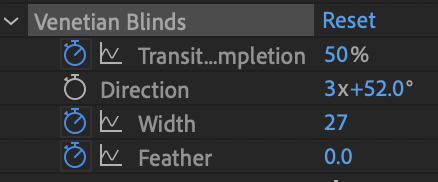


Figure 2


Comments